
Using a Web3 domain with Bitcoin.com Wallet makes sending and receiving crypto much simpler.
Instead of using a long and complicated wallet address like:
0xghhdb...
you can use a readable Web3 domain, such as:
YourName.YourTLD
Your Web3 domain is linked to your wallet address, and Bitcoin.com Wallet automatically resolves the domain to the correct address when sending funds. This removes the need to copy and paste long wallet strings and helps reduce mistakes.
This makes crypto transfers faster, easier, and more user-friendly, especially for people who are not comfortable checking long wallet addresses every time.
How to Receive Crypto with Your Web3 Domain on Bitcoin.com Wallet
To receive crypto using your Freename Web3 domain, follow these steps:
- Register a Web3 domain with Freename
- Mint the domain
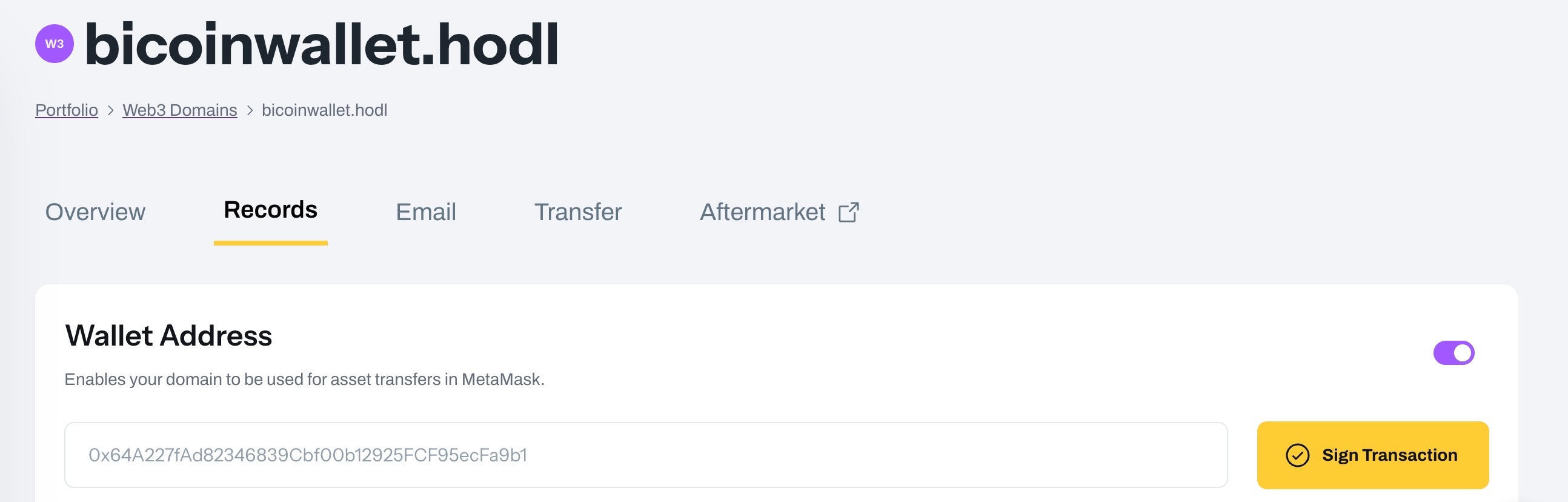
- Go to Web3 Domains → Manage → Records → Wallet Address
- Add your wallet address (if it is not already connected)
- Sign the transaction to confirm and save the record on-chain
Once your wallet address is set, you can simply share your domain (for example, YourName.YourTLD) with anyone who wants to send you crypto using Bitcoin.com Wallet.
How Sending Crypto Works in Bitcoin.com Wallet
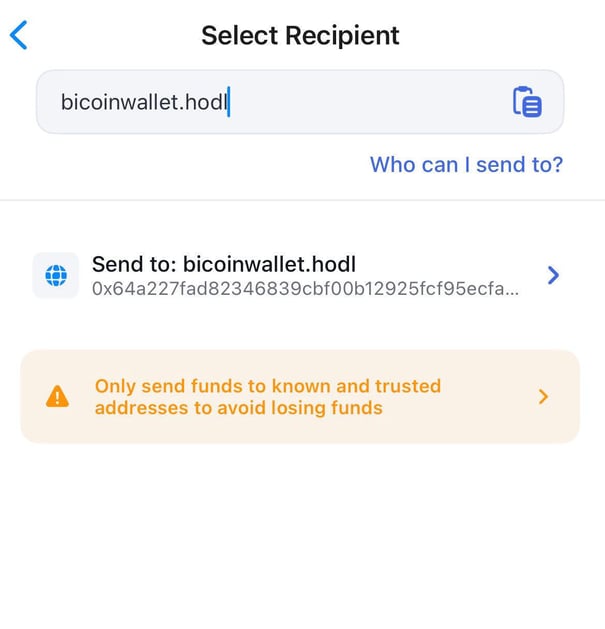
When sending crypto through Bitcoin.com Wallet, the sender can enter your Web3 domain instead of your full wallet address.
Bitcoin.com Wallet resolves the domain to the wallet address stored in your domain records, and the funds are sent directly to your wallet.
This creates a much smoother experience because:
- it is easier to read and share a domain name
- it reduces copy/paste mistakes
- it saves time when making repeated transactions
What Happens After the Sender Enters Your Domain?
Once the sender types your Freename domain into Bitcoin.com Wallet:
- The wallet checks the domain records
- It resolves the domain to your linked wallet address
- The sender confirms the transaction
- The crypto is sent directly to your wallet
No manual address copy/paste is needed, as long as your domain has been correctly configured with your wallet address.
FAQ
1. How does sending crypto with a Web3 domain work on Bitcoin.com Wallet?
On Bitcoin.com Wallet, the sender can type a Freename Web3 domain instead of a long wallet address. The wallet automatically resolves the domain to the correct address saved in the domain records, making the transaction faster and easier to complete.
2. How do I receive crypto using my Freename domain on Bitcoin.com Wallet?
First, register and mint your Freename Web3 domain. Then go to Manage → Records → Wallet Address, add your wallet address, and sign the transaction to confirm the record. After setup, you can share your domain name and receive crypto through Bitcoin.com Wallet.
3. What happens after someone enters my domain in Bitcoin.com Wallet?
Bitcoin.com Wallet reads the wallet address linked to your domain and uses it as the destination for the transaction. Once the sender confirms, the crypto is sent directly to your wallet, just like a normal transfer, but without entering the full address manually.
4. Where is Bitcoin.com Wallet supported?
For sending crypto to a Web3 domain on Bitcoin.com Wallet, users should install the Bitcoin.com Wallet mobile app on their device.
You can install the app on:
- Android (Google Play): https://play.google.com/store/apps/details?id=com.bitcoin.mwallet
- iOS (App Store): https://apps.apple.com/us/app/bitcoin-com-wallet-buy-sell/id1252903728
5. What should I do if my domain is not resolving?
If you have waited more than 24 hours and your domain is still not resolving in Bitcoin.com Wallet, make sure you completed the “Sign the transaction” step in your Freename account under your domain management settings. If the issue continues, please contact us at support@freename.com.