
If you own a Web2 domain such as Example.com registered with Freename and would like to transfer it to another Freename account, the process is simple and straightforward.
Here’s a step-by-step guide to help you complete the transfer smoothly.
Transfer a Web2 Domain to Another Freename Account
Transferring your domain to another Freename user only takes a few minutes.
Just follow the steps below:
1. Log in to Your Freename Account
Start by signing in to your Freename account and navigating to your Portfolio.
2. Open Domain Management
Locate the domain you wish to transfer and click on Manage.
3. Initiate the Transfer
Select Transfer, then click Unlock Transfer to enable the process.
4. Enter the Recipient’s Email
Type in the recipient’s Freename account email address carefully to ensure accuracy.
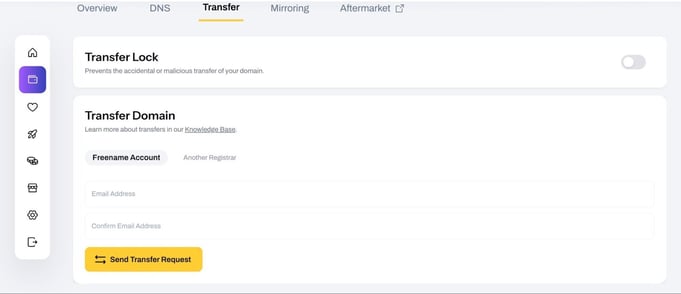
5. Confirm the Transfer
Review the details and confirm the transfer request.
What Happens Next?
Once the transfer has been initiated, it usually takes anywhere from a few minutes to a few hours to complete.
And that’s it! With just a few clicks, your Web2 domain can be securely transferred to another Freename account.
If you encounter any issues, you can always reach out to Freename’s support team for assistance.
FAQ
-
Can I transfer my Web2 domain to another Freename account?
Yes, if you own a Web2 domain (such as Example.com) registered with Freename, you can easily transfer it to another Freename account by following the transfer steps in your portfolio.
-
How long does it take to transfer a Web2 domain within Freename?
The transfer process only takes from a few minutes to a few hours.
-
Where do I start the domain transfer process?
You need to log in to your Freename account, go to your Portfolio, select the domain, and click Manage to access the transfer option.
-
Why do I need to unlock the domain before transferring?
Unlocking the transfer is a security step that allows the domain to be moved to another account. Without unlocking it, the transfer cannot proceed.
-
What information is required to transfer the domain?
You must enter the recipient’s Freename account email address accurately. If the email address is incorrect, the domain may be sent to the wrong recipient or the transfer may be delayed or fail.
-
What should I do if the transfer does not go through?
If you encounter any issues during the transfer process, you can contact Freename’s support team for assistance.