

Freename allows you to import both Web2 and Web3 domains into your account
Domain transfer from another registrar to Freename
This article explains how to import Web2 domains (such as .com, .net, .org) from another registrar into Freename.
Before You Begin
- You must have an active Freename account
- The Web2 domain must be at least 60 days old
- The domain must be unlocked at your current registrar
- You must have the EPP / Authorization Code
- Domain transfers may take up to 7 days, but often complete sooner
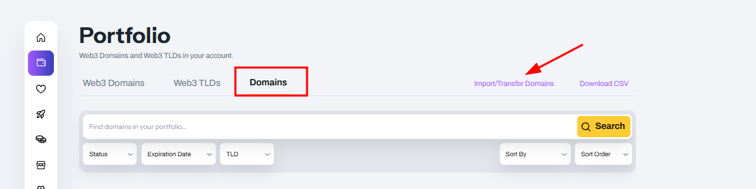
Step 1 – Access the Domain Import Section
-
Log in to your Freename account
-
Go to portfolio
-
Open the Domains tab
-
Click Import / Transfer Domains
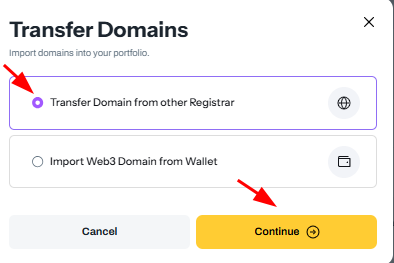
Step 2 – Select Web2 Domain Transfer
When the transfer modal opens:
- Select Transfer Domain from other Registrar
- Click Continue
Step 3 – Choose Single or Bulk Transfer
Option 1 – Single Domain Transfer
Use this option if you want to import only one Web2 domain.
- Select Single Domain Transfer
- Enter the domain name
- Enter the EPP / Authorization Code
- (Optional) Enable Auto-renew
- Click Confirm Transfer
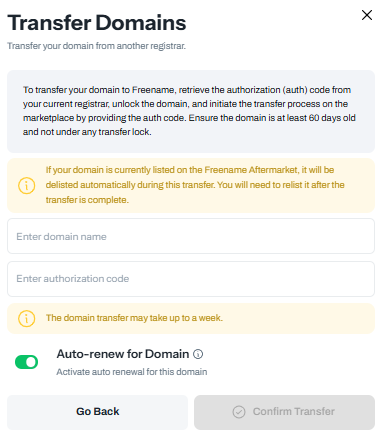
Important: Make sure the domain is unlocked at your current registrar before starting the transfer.
Option 2 – Bulk Domain Transfer
Use this option if you want to import multiple Web2 domains at once.
You have two ways to proceed:
Option A – Manual Entry
- Enter one domain per line
- Format:
Example.com, AUTHCODE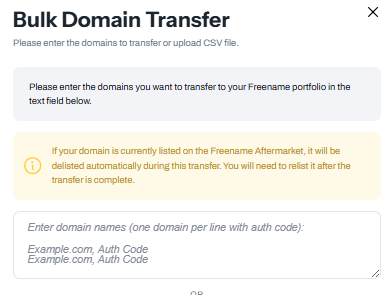
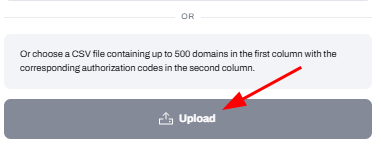
Option B – CSV Upload
- Upload a CSV file (up to 500 domains)
- First column: domain name
- Second column: authorization code
You can also enable: - Auto-renew for Domains
- Mirroring (mirror domains on Web3)
- Protection
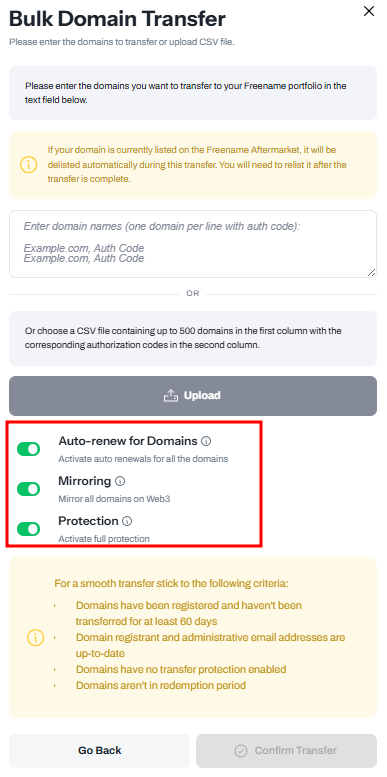
Once ready, click Confirm Transfer.
What Happens During a Transfer
The gaining registrar requests the transfer from the registry, and the losing registrar is notified. If no objection is raised within the allowed window, the registry auto-approves it. The domain then appears in your account.
The expiration date usually extends by one year (subject to the 10-year max). If auto-renewed recently at the losing registrar, that renewal may be reversed by the registry.
Fees, Renewal, and Timing
- Transfer fee usually includes a 1-year renewal (exceptions apply, for example .AI domains are currently renewed in 2-year terms).
- Expired domains can often transfer in Grace, not in Redemption or Pending Delete.
- Most transfers complete in 5 to 7 days, some ccTLDs can complete faster.
- Max registration term is 10 years; if already at cap, no extra year is added.
Additional Notes
- The transfer process will start immediately
- Transfers can take up to 7 days, depending on the previous registrar
- In many cases, transfers complete earlier
- If a domain is currently listed on the Freename Aftermarket, it will be automatically delisted during the transfer and can be relisted after completion.
- If you have any problem, please contact our support team: support@freename.com
FAQ
-
What types of domains can I import into Freename?
You can import Web2 domains (such as .com, .net, .org) from another registrar into your Freename account. -
What are the requirements to import a Web2 domain into Freename?
You must have an active Freename account. The Web2 domain must be at least 60 days old, unlocked at the current registrar, and you must have the EPP / Authorization Code. -
How long does a Web2 domain transfer take?
Web2 domain transfers can take up to 7 days to complete, depending on the previous registrar. In many cases, transfers are completed sooner. -
Can I import more than one Web2 domain at the same time?
Yes. You can import Web2 domains using either a single domain transfer or a bulk transfer. Bulk transfers support manual entry or CSV uploads of up to 500 domains. -
What information is required for bulk Web2 domain transfers?
For bulk transfers, you must provide the domain name and its authorization code for each domain. This can be done manually (one domain per line) or by uploading a CSV file with the required format.