
How to choose a blockchain and mint a Web3 domain
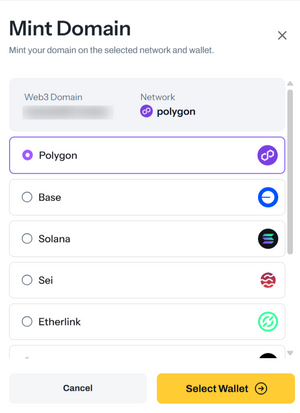
On Freename, you can mint your Web3 TLDs and Web3 Domains on different blockchains. This lets you choose the network that best fits your needs before starting the minting process.
Supported Blockchains
You can mint on:
- Polygon
- Base
- Solana
- Etherlink
- Chiliz
- Abstract
- BSC
- Aurora
How to Mint Your Web3 TLDs and Web3 Domains
- Go to: https://freename.com/dashboard/user/portfolio/
- In the Web3 Domains or Web3 TLDs section, select what you want to mint:
- Single domain/TLD: select it, then click Mint
- Multiple domains/TLDs: select them, then click Actions → Mint
- Choose:
- The blockchain (chain) you want to mint on
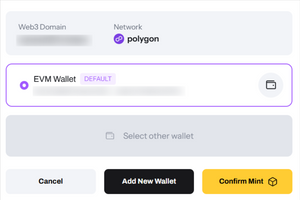
- The wallet you want to use to start the mint
- Confirm to submit the mint request.
How to Add Your Wallet to Freename
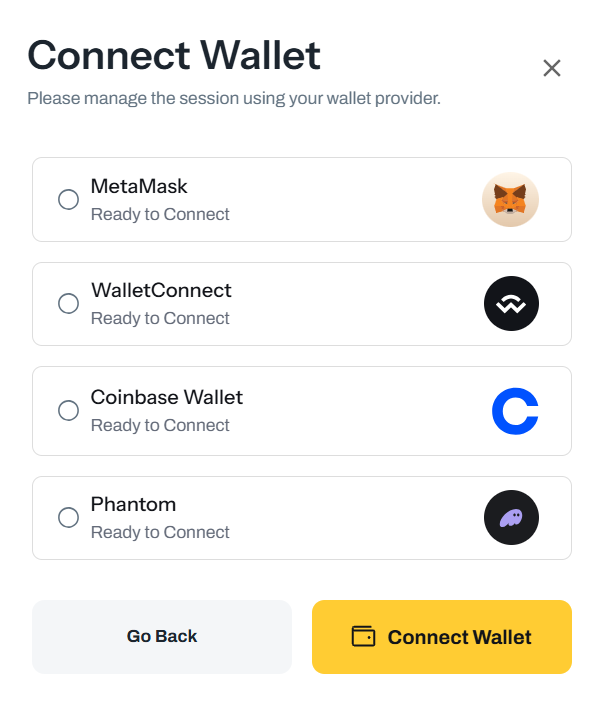
- Go to: https://freename.com/dashboard/user/settings/
- Click Add Wallet
- Paste or connect your wallet address and save it.
Once added, you can select that wallet when you mint.
FAQ
-
Which blockchains can I mint on?
Polygon, Base, Solana, Etherlink, Chiliz, Abstract, BSC, and Aurora. -
Can I mint multiple domains at once?
Yes. Select multiple items, then use Actions → Mint. -
Why does minting sometimes take up to 72 hours?
Blockchain transactions and confirmations can take longer depending on network conditions. The process is automatic and can’t be sped up manually. -
Can I undo or cancel a mint?
No. Once requested, minting is irreversible. -
If I picked the wrong chain, what can I do?
For now, you must wait for the mint to complete. A future Freename option will allow changing the chain if needed. -
What is Wallet Custody used for?
It lets you mint without installing anything locally. It works only with Polygon and Base, and it does not store your private keys. -
Can I move assets from Wallet Custody to my own wallet (or the other way around)?
Yes, you can transfer from the asset management page whenever you want. -
How can I quickly find assets that are not minted yet?
Use Status → Not Minted filters in the portfolio page under Web3 Domains or Web3 TLDs.