

This guide explains how to connect a domain registered with Freename to your Wix website, allowing visitors to access your site using your custom domain.
If you use Wix and want to connect a domain purchased outside Wix, you need to have their Premium plan. If you already have one, you can point your domain to Wix by using Wix nameservers or A and CNAME records.
Before You Begin poiting a domain
- Your domain must be active in your Freename account
- You must have access to your Wix dashboard
- DNS changes may take up to 72 hours to fully propagate
Method 1 – Connect Using Wix Nameservers
Use this method if you want Wix to manage all DNS settings for your domain.
Steps:
- Log in to your Wix account and locate the nameservers assigned to your domain.
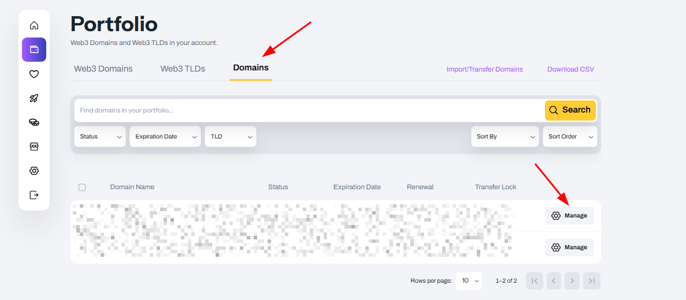
- Log in to Freename, go to your Portfolio, select the domain you want to point and go to manage.
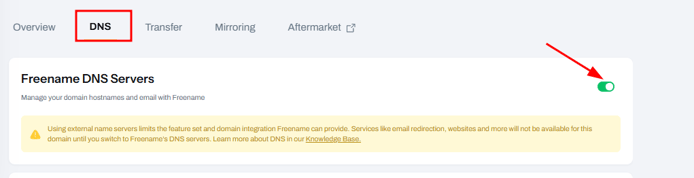
- Go to DNS and unlock the Freename DNS Server option.
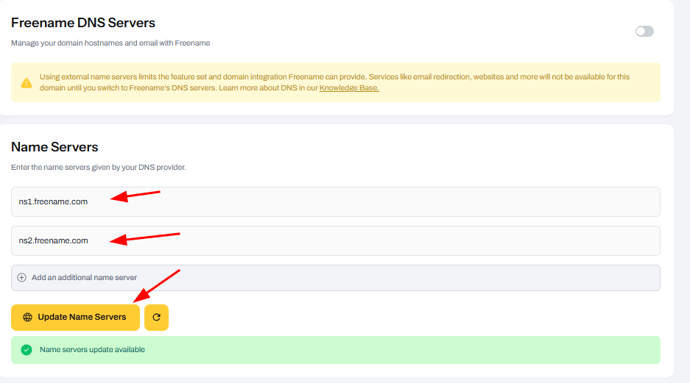
- Switch to the NameServers provided by Wix and click on Update Name Servers.
DNS propagation will begin and may take up to 72 hours.
Method 2 – Wix A and CNAME Records
Use this method if you want to keep DNS management within Freename.
Steps:
- In your Wix dashboard, obtain the required A record and CNAME record values.
- Log in to Freename, go to your Portfolio, select the domain you want to point and go to manage.
- Add the DNS records exactly as provided by Wix
Go to DNS record and click Add a record.
- A record for the root domain (@)
- CNAME record for the www subdomain
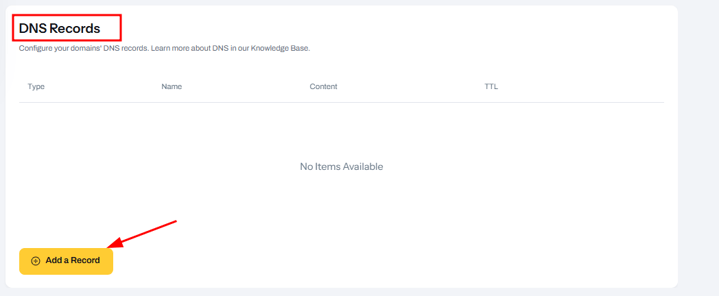
- Enter the records provided by Wix, and click "Save Record."
Once DNS propagation is complete, your domain will resolve to your Wix website.
NOTES:
- The propagation of any record can take up to 72 hours to fully propagate, so after making the change, it is important to wait if your website is not working.
- To check propagation, visit the website DnsChecker, enter your domain and the record you added, and check how it is going. If 72 hours have passed and you notice that propagation is "stuck," please contact our support team.
FAQ
-
Can I connect a Freename Web2 domain to a Wix website?
Yes. You can connect a Freename Web2 domain to a Wix website by pointing it to Wix using nameservers or DNS records. -
Do I need a Wix Premium plan to connect a Freename Web2 domain?
Yes. To connect a domain purchased outside Wix, including a Freename Web2 domain, you must have an active Wix Premium plan. -
Can I connect my Freename Web2 domain to Wix using nameservers?
Yes. You can replace the current nameservers with the ones provided by Wix. This option lets Wix manage all DNS settings for your Web2 domain. -
Can I keep DNS management on Freename for a Web2 domain connected to Wix?
Yes. You can keep DNS management within Freename by adding the A record and CNAME records provided by Wix. -
How long does DNS propagation take for a Web2 domain?
DNS changes for a Web2 domain can take up to 72 hours to fully propagate. -
What records are required to connect a Freename Web2 domain to Wix?
You need to add an A record for the root domain (@) and a CNAME record for the www subdomain, using the values provided by Wix.