
A Web3 Top-Level Domain (TLD) is the highest level of a domain name, the final part of an address (for example, .metaverse in your.metaverse). Owning your own TLD gives you full control over a namespace in the decentralized web and opens the door to unique branding, community creation, and revenue opportunities.
With Freename, anyone can create, register, and mint a Web3 TLD easily, and once minted, it belongs to you permanently without renewal fees.
Why Create Your Own TLD?
A custom Web3 TLD lets you:
- Own a unique namespace on Web3, distinguishing your brand or project.
- Build an ecosystem of domains underneath your TLD (e.g., name.yourtld).
- Monetize your extension through royalties when others register domains under your TLD. You can earn up to 50% of the registration fee.
- Establish strong brand identity and visibility in the decentralized web space.
Creating your own TLD is a powerful way to build your presence in Web3 and unlock new digital and revenue opportunities.
Step-by-Step: How to Create a Web3 TLD on Freename
1. Create or Log in to Your Freename Account
If you don’t already have a Freename account, sign up using your email address or using Login with Google
Once logged in, you can search for the TLD you want on our front page by typing in the TLD you want.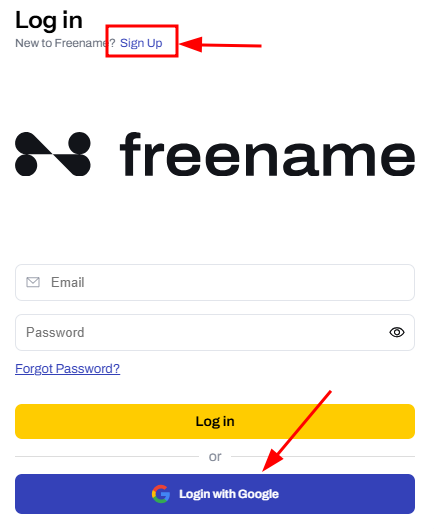
2. Search for Your Desired TLD
- On the Freename homepage or search bar, enter the extension you want, starting with a dot, for example: .token, .sat or .yourbrand
- Click Search.
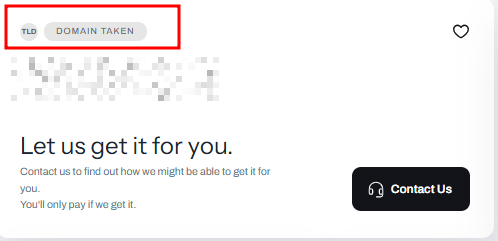
- If the TLD is already registered by someone else, the name "domain taken" will appear.
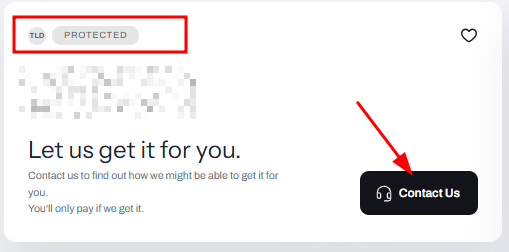
- If it's marked as protected, it might be a premium TLD; in that case, please contact our support team.
- If it’s available, it will be shown with a cart icon for purchase.
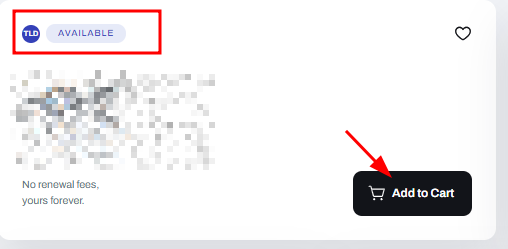
- If the TLD is already registered by someone else, the name "domain taken" will appear.
3. Purchase the TLD
- Add your chosen TLD to the cart.
- Complete the checkout using your preferred payment method (credit card or supported wallet).
Once purchased, the TLD appears in your Portfolio under Top-Level Domains.
4. Mint Your TLD to the Blockchain
To have full blockchain ownership:
- Go to Portfolio —> Web3 TLDs in your account.
- Select the TLD you purchased.
- Click Mint to register it on a supported blockchain (e.g., Polygon, BSC, Aurora).
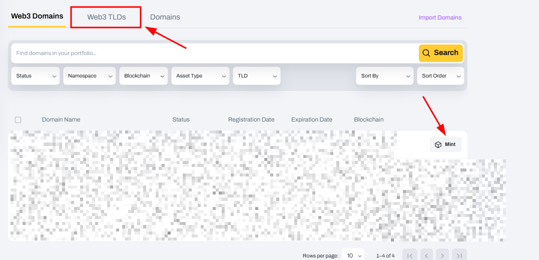
- Confirm the transaction using your wallet.
Once minted, the TLD is stored in your wallet and fully owned by you.
Tips for Choosing Your TLD
When selecting a Web3 TLD:
- Choose something memorable and brandable that reflects your project’s identity.
- Consider your community or niche - for example, .art for creative communities or .chain for blockchain projects.
- Check availability early - popular or simple TLDs can be registered quickly by others.
- Ensure compatibility with the blockchain you plan to mint on
Benefits of Owning Your Web3 TLD
Owning a TLD unlocks opportunities beyond brand identity:
- Royalties: Earn 50% royalties when others register domains under your TLD.
- Community building: Create a namespace for your project or community members.
- Web3 visibility: Increase legitimacy and reach in the decentralized ecosystem.
- Permanent ownership: Once minted on-chain, your TLD is yours indefinitely.
Get Started Today
Creating your own Web3 TLD on Freename is straightforward and flexible. Start by searching your desired extension on the Freename site, check availability, and mint it to the blockchain to gain full ownership.
When others register domains under your TLD, you can begin earning royalties and building your namespace ecosystem.
Notes
- We always recommend creating your TLD using a Freename account and minting it to your wallet to ensure full on-chain ownership.
- Once a TLD is minted, it becomes a permanent blockchain asset and does not require renewals.
- Make sure to choose your TLD carefully, as popular or short extensions may become unavailable quickly.
If you have any questions or need assistance, please contact our support team. Our team will be happy to help.
FAQ
-
What is a Web3 Top-Level Domain (TLD)?
A Web3 TLD is the highest level of a domain name in the decentralized web, such as .metaverse. It allows you to purchase Web3 domains under your own TLD at up to 50% of the registration price as the TLD owner, manage your TLD with dedicated features, and activate add-ons such as Royalties and Reseller Tools. -
Do I need to renew my Web3 TLD every year?
No. Once your TLD is minted on the blockchain, it becomes a permanent on-chain asset. There are no renewal fees or expiration dates. -
What does it mean if a TLD is marked as “protected”?
A protected TLD may be classified as premium or reserved. This does not always mean it can never be sold. In some cases, the owner may allow transfers or external sales. If you’re interested, you can contact the support team for more details. -
Can I earn money from my Web3 TLD?
Yes. If your TLD is set as public and the Royalties add-on is active, you can earn up to 50% of the registration fees when other users register domains under your TLD. -
Where is my TLD stored after minting?
After minting, your TLD is stored directly in your connected wallet on the selected blockchain (such as Polygon, BSC, or Aurora), giving you ownership and control. -
Do I need a wallet to create a Web3 TLD on Freename?
You can purchase a TLD using a Freename account. To mint the TLD on-chain, you can use a compatible external wallet or the Freename Custody Wallet on supported networks such as Polygon and Base. Minting is strongly recommended to ensure on-chain ownership of your TLD.