

A Wildcard DNS record allows you to route any subdomain that does not explicitly exist to a single destination. This is extremely useful when you want to handle dynamic subdomains, simplify DNS management, or support scalable applications without manually creating DNS records for each subdomain.
This guide explains what wildcard DNS records are, how they work, when to use them, and how they apply to Freename-managed domains.
1. What Is a Wildcard DNS Record?
A wildcard DNS record uses the * (asterisk) character to match any subdomain that is not explicitly defined.
Example:
*.example.com
This means:
- app.example.com
- blog.example.com
- anything.example.com
will all resolve to the same destination unless a specific record exists for that subdomain.
2. How Wildcard DNS Works (Technical Overview)
Wildcard DNS works by acting as a fallback rule.
DNS resolution order:
- Exact match (e.g. blog.example.com)
- Wildcard match (e.g. *.example.com)
- No match → NXDOMAIN
So if:
- shop.example.com has no record
- *.example.com exists
Then DNS will use the wildcard record.
Important technical detail:
Explicit DNS records always override wildcard records.
3. Common Types of Wildcard DNS Records
Wildcard records can be created for multiple DNS types.
3.1 Wildcard A / AAAA Record
Routes all subdomains to a single IP.
Example:
Host: *
Type: A
Value: 203.0.113.10
Used for:
- Catch-all websites
- SaaS platforms
- Landing pages
3.2 Wildcard CNAME Record
Routes all subdomains to another hostname.
Example:
Host: *
Type: CNAME
Value: app.hostingprovider.com
Used for:
- CDN setups- Hosting platforms
- Multi-tenant apps
3.3 Wildcard MX Record
Routes email for all subdomains.
Example:
Host: *
Type: MX
Mail Server: mail.example.com
Note: rarely recommended unless you fully understand email routing.
4. When Should You Use a Wildcard DNS Record?
Wildcard DNS is useful when:
- You need unlimited subdomains
- Subdomains are created dynamically
- You run:
- SaaS platforms
- Multi-tenant apps
- User-generated subdomains
- You want a catch-all website
- You want to simplify DNS management
5. When You Should NOT Use Wildcard DNS
Avoid wildcard DNS when:
- Each subdomain must resolve differently
- You need strict DNS control
- You are troubleshooting email issues
- You rely heavily on SEO for subdomains
- Security policies require explicit records
Wildcard DNS can sometimes mask configuration errors, making debugging harder.
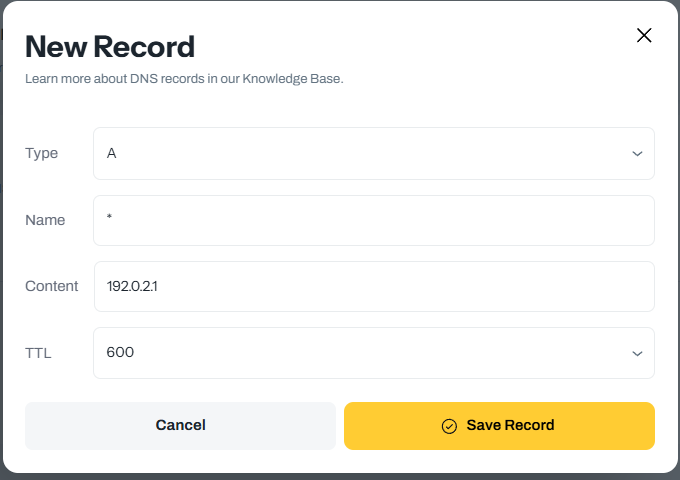
6. Wildcard DNS in Freename
Freename fully supports wildcard DNS records at the domain level.
You can create wildcard records in:
Portfolio → Domains → Manage → DNS
Example wildcard setup in Freename:
- Host / Name: *
- Type: A or CNAME
- Value: your IP or target hostname
- TTL: default or custom
Once saved, any undefined subdomain will automatically resolve.
7. Wildcard DNS and SSL Certificates
Important note:
Wildcard DNS does not automatically provide SSL.
You must:
- Use a wildcard SSL certificate (*.example.com)
- Or use a provider that supports on-demand certificates (e.g. Cloudflare, certain CDNs)
Without proper SSL, browsers will show security warnings.
8. Common Wildcard DNS Mistakes
- Expecting wildcard to override explicit records
- Forgetting SSL configuration
- Using wildcard MX without understanding mail flow
- Combining wildcard CNAME with conflicting records
- Assuming wildcard works for the root domain (it does not)
FAQ
What is a wildcard DNS record?
A wildcard DNS record uses the * (asterisk) to match any subdomain that does not have an explicit DNS record, routing all undefined subdomains to a single destination.
Do specific (explicit) DNS records override the wildcard?
Yes. DNS resolution checks an exact match first, and only uses the wildcard (*.example.com) as a fallback if no explicit record exists for that subdomain.
Which wildcard record types are commonly used?
You can create wildcard records for multiple DNS types, including:
-
Wildcard A/AAAA (routes all subdomains to one IP)
-
Wildcard CNAME (routes all subdomains to another hostname)
-
Wildcard MX (routes email for all subdomains, but it’s rarely recommended unless you fully understand email routing)
How do I create a wildcard DNS record in Freename?
Freename supports wildcard DNS at the domain level. You can add it from:
Portfolio → Domains → Manage → DNS
Typical setup:
-
Host/Name:
* -
Type:
AorCNAME -
Value: your IP or target hostname
-
TTL: default or custom
Does wildcard DNS automatically give me SSL for subdomains?
No. Wildcard DNS does not automatically provide SSL. You must use a wildcard SSL certificate (for example *.example.com) or use a provider that supports on-demand certificates (for example Cloudflare or certain CDNs).