
If you need to update the email linked to your Freename account, you can do it from your account settings using a one-time verification code (OTP) sent to your current email address.
Before You Start
- You must have access to your current email inbox to receive and verify the OTP.
- If your Freename account was created using Google sign-in, email changes are not supported (see the note below).
Step-by-Step: Change Your Email
- Go to: https://freename.com/dashboard/user/settings/
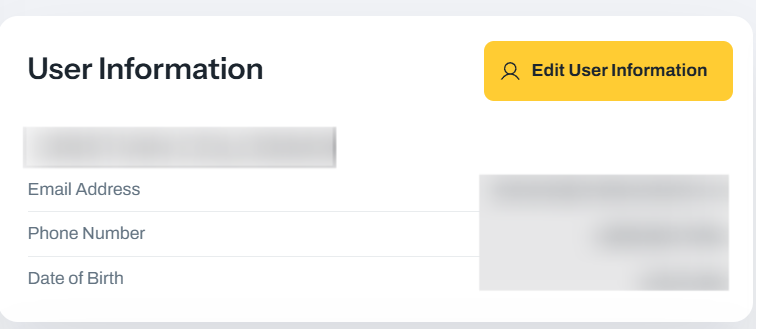
- Click User Information.
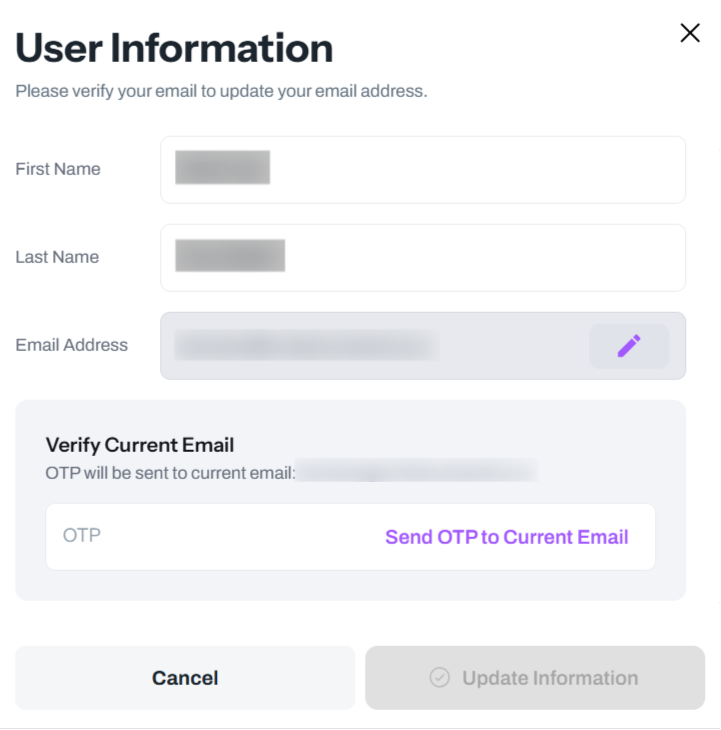
- Click the edit email icon, then click Send OTP to Current Email.
- Enter the code you received by email, then click Verify OTP.
- Enter your new email address, then click Update Information.
Once completed, your Freename account will be associated with the new email address.
Important Note for Google Accounts
If you use Google sign-in, it is not possible to change the email address on that Freename account.
In this case, you can:
- Create a new Freename account
- Connect your wallet
- Click Import if you want to import your Web3 TLDs and Web3 Domains
Web2 domains: you must wait 60 days from registration/transfer before you can transfer them.
Troubleshooting: Not Receiving the OTP Email
If you don’t receive the “Send OTP” email:
- Wait a few minutes and try again
- Check your SPAM/Junk folder carefully
FAQ
-
Can I change my email without access to my current email inbox?
No. You must verify the OTP sent to your current email before you can set a new one. -
I use Google sign-in. Why can’t I change my email?
Google-linked accounts don’t support email changes. The workaround is creating a new Freename account and importing your Web3 assets. -
Will “Import” move my Web3 TLDs and Web3 Domains to the new account?
Yes - after you connect your wallet in the new account, you can use Import to bring in your Web3 TLDs and Web3 Domains. -
Can I transfer my Web2 domains immediately to the new account?
No. Web2 domains require a 60-day waiting period after registration/transfer before they can be transferred. -
What should I do if the OTP email never arrives?
Wait a few minutes, check SPAM/Junk, and then try sending the OTP again from the settings page.