
A Reseller Page is a public page that lets you showcase and sell domains under your Web3 TLD in a simple storefront-style view. Visitors can search available domains, add them to cart, and complete a purchase without needing extra instructions.
Example Reseller Page: https://freename.io/discover/metaverse
Important: To activate and use the Reseller Page, your TLD must have the Reseller Tools option enabled.
What the Reseller Page Includes
- Domain browsing and search
Visitors can search available domains under your TLD and explore what is available. - Add to cart and purchase flow
Buyers can add domains to cart and proceed with checkout. - Background customization
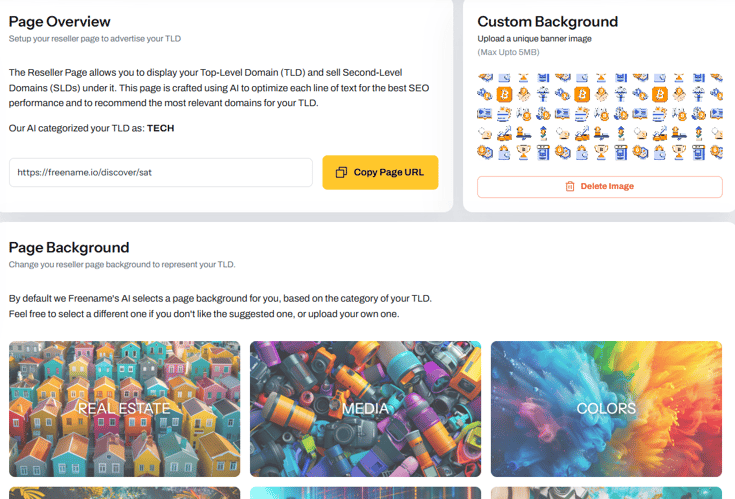
You can choose from available backgrounds or upload a custom background for your page. - Content and layout
The page includes structured sections and a FAQ area to answer common buyer questions.
How to Activate and Use It
1. Log in to your Freename account.2. Go to Portfolio and open the Manage your TLD section.
3. Open Reseller Page.
4. Deploy the page and select or upload your preferred background.
5. Share your Reseller Page link anywhere you want.
FAQ
1) What is the Reseller Page used for?
It is a public page that helps you showcase and sell domains under your TLD, with search and add-to-cart functionality for buyers.
2) Do I need anything enabled to activate it?
Yes. To activate the Reseller Page, you must have Reseller Tools enabled on your TLD.
3) How do I activate Reseller Tools?
You can enable Reseller Tools from the management page of your Web3 TLD. Reseller Tools is an additional option, separate from the Royalties option.
4) Can I edit the Reseller Page description and replace it with my own?
Currently, this change is not available as a self-service option. If you want to request a custom description update (so we can review and evaluate it), email support@freename.com and attach a Word or .TXT document that includes all three description sections you would like to use.
5) How do I share my Reseller Page?
After deployment, you can copy the page link and share it anywhere you want.
6) I activated the Reseller Page but it’s not active yet or it looks incomplete. What can I do?
Try opening the page in a different browser or in incognito/private mode. If the issue persists after 24 hours, contact us at support@freename.com.
7) I uploaded a custom background but it does not change. What can I do?
Try uploading a background that is smaller in file size (MB) and uses a different image dimension. If the issue persists, contact support at support@freename.com.
8) Can I embed the Reseller Page on my website using an iframe?
For security reasons, this is not allowed. If you want to sell domains under your TLDs through your own project or website, you can request access to the Reseller APIs here: https://freename.com/apis/reseller-api